How Google Reviews can help Real Estate agents!

The Importance of Google Reviews for Real Estate Agents: Building Trust and Credibility

In the digital era, online reputation plays a pivotal role in influencing consumer decisions across various industries, including real estate. As prospective homebuyers and sellers increasingly turn to the internet to research and select real estate agents, Google Reviews emerge as a critical component of an agent’s online presence. In this blog post, we’ll delve into the significance of Google Reviews for real estate agents and explore how they contribute to building trust, credibility, and success in the competitive real estate market.

Looking for an easy way to gather and display Google Reviews on your website? Check out the Elfsight Google Review widget!

1. Enhancing Visibility and Online Presence

a. Boosting Local SEO Rankings

  • Google Reviews significantly impact your local search engine optimization (SEO) rankings. A higher number of positive reviews signals to Google that your business is credible and trustworthy, potentially leading to improved visibility in local search results.

b. Increasing Online Exposure

  • Positive Google Reviews serve as testimonials from satisfied clients, enhancing your online reputation and increasing your visibility to prospective clients searching for real estate agents in your area.

2. Building Trust and Credibility

a. Establishing Social Proof

  • Google Reviews provide social proof of your expertise, professionalism, and customer satisfaction. Positive reviews from past clients demonstrate your ability to deliver exceptional service and results, fostering trust among potential clients.

b. Showcasing Client Experiences

  • Client testimonials and experiences shared through Google Reviews offer valuable insights into your service quality, responsiveness, market knowledge, and negotiation skills, reinforcing your credibility as a trusted real estate professional.

3. Driving Customer Engagement and Conversions

a. Influencing Purchase Decisions

  • According to studies, a significant percentage of consumers trust online reviews as much as personal recommendations. Positive Google Reviews can influence prospective clients’ purchase decisions, encouraging them to choose your services over competitors.

b. Facilitating Client Relationships

  • Responding promptly and professionally to Google Reviews demonstrates your commitment to customer satisfaction and service excellence. Engaging with clients through reviews fosters positive relationships, encourages feedback, and enhances your reputation as a client-focused real estate agent.

4. Gaining Valuable Feedback and Insights

a. Evaluating Performance and Service Quality

  • Google Reviews provide valuable feedback and insights into your performance, service quality, strengths, and areas for improvement. Analyzing client feedback enables you to refine your services, address concerns proactively, and exceed client expectations.

b. Identifying Market Trends and Preferences

  • Monitoring Google Reviews allows you to identify emerging market trends, preferences, and client needs. By staying informed and responsive to client feedback, you can adapt your strategies, offerings, and communications to meet evolving market demands effectively.

5. Differentiating Your Brand and Services

a. Highlighting Unique Selling Points

  • Google Reviews enable you to highlight your unique selling points, strengths, expertise, and successful transactions. Sharing client testimonials, success stories, and positive experiences distinguishes your brand, services, and value proposition in a competitive real estate market.

b. Building a Strong Online Reputation

  • Cultivating a strong online reputation through Google Reviews sets you apart from competitors and positions you as a top-rated, reliable, and reputable real estate agent. A consistent influx of positive reviews enhances your credibility, attracts prospective clients, and contributes to long-term business success.

Conclusion

In summary, Google Reviews play a pivotal role in shaping the online reputation, visibility, trustworthiness, and success of real estate agents in today’s competitive market. By actively encouraging satisfied clients to share their positive experiences, promptly responding to feedback, and continuously delivering exceptional service, real estate agents can leverage Google Reviews to build a strong online presence, differentiate their brand, and establish lasting relationships with clients. Embrace the power of Google Reviews as a cornerstone of your digital marketing strategy, and unlock new opportunities for growth, recognition, and success in the dynamic real estate landscape.

How to set up and use the Elfsight YouTube Gallery widget on your Real Geeks site


Enhancing Your Real Estate Website with Elfsight YouTube Gallery Widget

Introduction

In the dynamic world of real estate, engaging potential clients through visually appealing content is key. Integrating a YouTube gallery on your website not only showcases your property listings in a compelling way but also improves user engagement and SEO. Elfsight, with its user-friendly YouTube Gallery Widget, offers a seamless way to achieve this. In this guide, we’ll walk you through the steps to configure, add, and effectively use this widget on your real estate website.

Here are a couple of sites we have built that have the YouTube Gallery widget on them:

Step 1: Sign Up for ElfsightStep 2: Create Your YouTube Gallery Widget

  1. Access the Dashboard: Use this link to access the YouTube Gallery Builder.
  2. Choose your Template: There are different templates depending on what kind of widget and layout you want to use. Once you have decided which template will work best, click “Continue with this template” to continue.
  3. Add the Source: Copy the link to your YouTube Channel and paste it into the “YouTube Channel URL” box.
  4. Customize: Customize the widget to match your website’s style. You can select layouts, define the number of videos to display, and choose how they play (e.g., in a pop-up, directly on the page). These options are along the left-hand side of the page.

Step 3: Configure the Widget

  1. Adjust the Settings: Tailor the settings to enhance user experience. For instance, set the video to autoplay, but mute the sound to not overwhelm visitors initially.
  2. Optimize for SEO: Use keywords in your video titles and descriptions to boost your website’s SEO. Another trick is to rename the video file to something descriptive like homes_for_sale_in_Goodyear_AZ.mp4 before you upload it to YouTube. Here are some additional tips on getting your YouTube videos ranked: https://www.premiumbeat.com/blog/5-quick-tips-to-boost-your-videos-youtube-rank/

Step 4: Add the Widget to Your Website

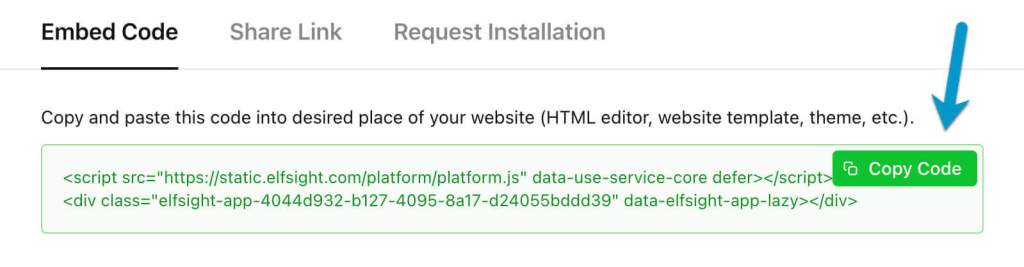
  1. Get the Code: Once your widget is ready, click ‘Publish’ and then ‘Install’.
  2. Copy the Code: Click the green “Copy Code” button
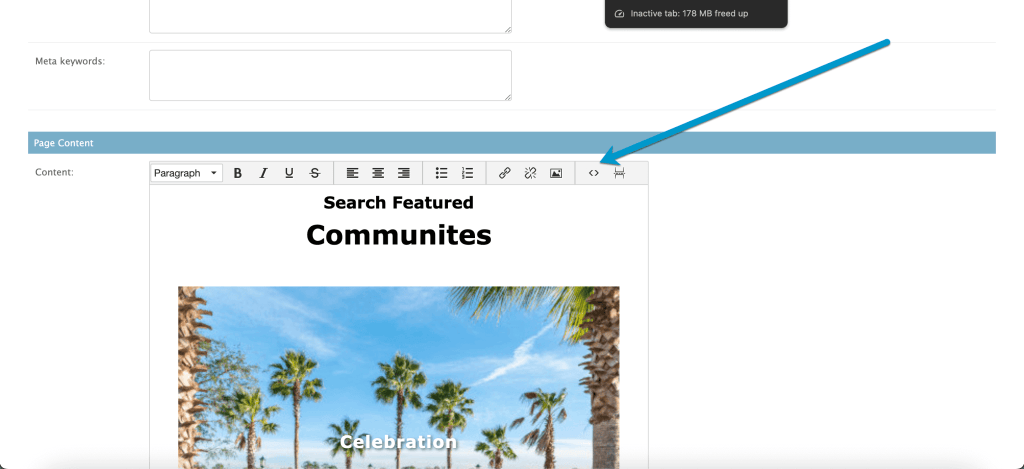
  3. Embed the Code: Copy this code and paste it into the page of your website where you want the gallery to appear. You will need to paste the code using the source code option, the button in the Real Geeks editor looks like this: <>

Source Code section of the Real Geeks Editor:

Step 5: Test and Go Live

  1. Save the Page: Once you have pasted the new widget code into the source code section of the page click “SAVE AND CONTINUE EDITING” at the bottom of the page.
  2. Preview the Widget: Now click on “VIEW ON SITE” button in the upper right-hand corner to check how the widget looks on your website. Ensure that it’s responsive and works well on both desktop and mobile views.
  3. Go Live: Once you’re satisfied with the setup, your YouTube gallery is ready to go live. This visual addition will enhance your property listings and provide an interactive experience for your clients.

Conclusion

Adding a YouTube gallery to your real estate website is a fantastic way to showcase properties, Cities, Neighborhoods, and engage with potential buyers. Elfsight’s YouTube Gallery Widget is an easy and effective tool to integrate this feature. With its customizable options and straightforward implementation, you can create an immersive user experience that not only showcases your listings but also boosts your website’s appeal and functionality.

Remember, the key to a successful real estate website is not just the properties you list but how you present them. A YouTube gallery is a step towards making your website more interactive and engaging for your visitors.

Changing the “Meet the Team” text on the About page

Here is the code you need to add to the Footer of your site, using the source code editing feature, to change the Meet the Team text on the About Page. The source code editor button looks like this <> and gives you access to add new code. You do not add this directly into the Footer itself, it has to go only in the source code section.

You replace the “Your custom text” with whatever you want it to say but keep both ” ” before and after.

Anna and Anna Modern Script

<script>
var agentsHeading = document.querySelector('#agents h2');
var customMeetText = "Your custom text"; // Replace with your custom text
if (agentsHeading) {
  agentsHeading.innerHTML = customMeetText;
}
</script>

Miranda Script

<script>
    var agentsHeading = document.querySelectorAll('h2');
    var aboutPageURL = '/about/';
    var customMeetText = "Your custom text"; // Replace with your custom text
    if (window.location.pathname == aboutPageURL) {
        for (i = 0; i < agentsHeading.length; ++i) {
            if (agentsHeading[i].innerHTML === 'Meet the Team') {
                agentsHeading[i].innerHTML = customMeetText;
            }
        }
    }
</script>

Google’s Mobile-First Indexing

As the digital landscape rapidly evolves, real estate website owners must stay agile to remain competitive. Google’s completion of its Mobile-First Indexing marks a critical shift that every real estate professional should be aware of. This update isn’t just another tweak; it’s a game-changer in the world of search engine optimization (SEO).

Google now prioritizes the mobile version of websites in its indexing and ranking system, making it essential for real estate websites to adapt. This article will break down Google’s Mobile-First Indexing and offer actionable insights for real estate professionals looking to maintain or improve their online presence.

What is Google’s Mobile-First Indexing?

Google’s Mobile-First Indexing is a significant shift in how web content is assessed and ranked. Traditionally, Google used the desktop version of a website to determine its relevance to a user’s search query. However, with Mobile-First Indexing, Google now uses the mobile version of a website for indexing and ranking. This change reflects the growing trend of mobile usage, as more than half of global web traffic now comes from mobile devices.

This shift underscores the importance of having a mobile-friendly real estate website. If your mobile site doesn’t offer the same high-quality content as your desktop site, your search rankings could suffer. Ensuring that your mobile site is optimized is now a critical aspect of maintaining visibility in search results.

When Did Google Start Mobile-First Indexing?

Google began rolling out Mobile-First Indexing over 6.5 years ago, with the approach officially introduced in November 2016. Initially, it involved indexing websites from a mobile-first perspective, with half of Google’s search results indexed this way by December 2018.

In March 2020, Google set a deadline for all websites to transition to Mobile-First Indexing by September 2020. This deadline was later extended to March 2021. By May 2021, Google announced that the transition to Mobile-First Indexing was complete, marking a new era for SEO.

What to Expect With This Change?

With the full rollout of Mobile-First Indexing, real estate website owners need to be aware of several key implications:

  • Mobile Optimization is Crucial: If your real estate website isn’t fully optimized for mobile devices, you may experience a drop in search rankings. Google now prioritizes mobile-friendly sites, and those that aren’t optimized could see a decline in traffic due to lower visibility in search results.
  • Content Matters: Google will only reference the mobile version of your website for indexing and ranking. If important content—such as property listings, images, or videos—is missing from your mobile site, it won’t contribute to your search ranking.
  • User Experience (UX) on Mobile is Key: Google’s algorithms will evaluate the mobile version of your website for factors like load speed, button sizes, font readability, and navigation. A poor mobile UX could negatively impact your rankings.
  • Meta Tags and URL Structures: If your website uses dynamic serving or has separate URLs for mobile and desktop versions, ensure that meta tags are correctly implemented for both. Google recommends using the same meta robot tags on both versions to avoid indexing issues.

With Google’s Mobile-First Indexing, creating a comprehensive, user-friendly mobile website experience is more critical than ever. Real estate professionals must adapt quickly to these changes to maintain or enhance their online visibility and performance.

0